
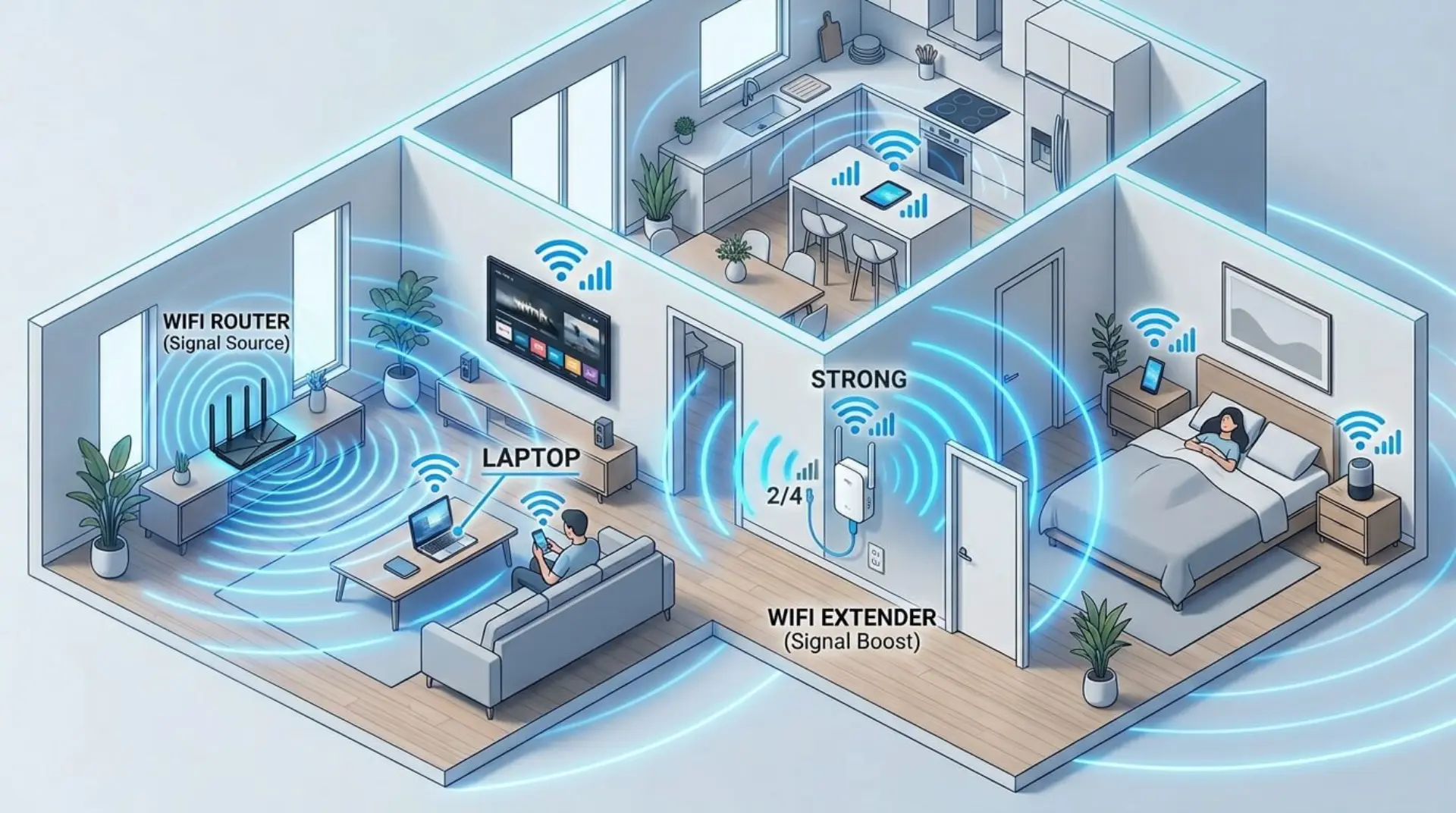
A weak WiFi signal can disrupt everything from work productivity to entertainment. You may have a fast internet plan, but if your connection doesn’t reach every room, the experience quickly becomes frustrating. This is often not an issue with your internet speed, but rather how your home network setup is structured and how effectively your router distributes signals.
Instead of upgrading your entire system, a smarter solution is to use a WiFi extender. It helps expand your existing network, improves coverage in hard-to-reach areas, and ensures a more stable connection throughout your space. When combined with the right placement and basic network optimization techniques, it can significantly improve your overall internet performance.
What is a WiFi Extender and How Does it Work?
An internet range extender is a device that receives the signal from your router and rebroadcasts it to areas where the connection is weak. It essentially extends your network’s reach without replacing your router.
This makes it ideal for homes with multiple rooms, thick walls, or areas where signals drop frequently. Many users who experience weak connectivity also explore ways to increase WiFi performance or use a WiFi booster for additional support. Improving placement and reducing wireless signal interference also play a major role in strengthening overall signal quality.
Connecting the Extender to Your Router
Quick Setup Using WPS
The simplest way to connect the device is through the WPS feature. This method allows it to pair with your router automatically, without requiring any manual configuration.
- Plug the extender near your router
- Press the WPS button on both devices
- Wait for the connection to establish
This approach is quick and effective for most standard setups.
Manual Configuration
For users who prefer more control, the extender can be configured manually through a browser. After connecting to its default network, you can access the setup page and link it to your main WiFi.
This method is especially useful when automatic setup fails or when you want to adjust settings for better performance using a reliable router configuration.
Using a WiFi Extender the Right Way
Setting up the device is only one part of the process. Its real effectiveness depends on how and where it is placed. Proper positioning plays a key role in maintaining a strong and stable connection.
It should be installed in a spot where it can still receive a reliable signal from the router while improving coverage in weaker areas. If placed too far, it may simply carry forward a poor connection instead of enhancing it.
Environmental factors such as walls, furniture, and nearby electronics can cause wireless signal interference, which reduces overall efficiency. Testing different locations and checking performance with internet speed test tools can help you find the most effective position for better coverage.
Setting Up a TP-Link WiFi Extender
Using the Mobile App
TP-Link provides a simple mobile application that guides users through the setup process step by step. It detects the extender automatically and helps connect it to your existing network without technical complexity.
Using the Web Interface
The web-based setup offers more flexibility and control. By accessing the extender’s configuration page, users can customize network settings and improve stability based on their specific requirements.
Both methods are effective, and the choice depends on whether you prefer convenience or detailed control over your WiFi services solutions.
Resetting the Extender
Over time, network issues can occur due to incorrect settings or connection errors. Resetting a WiFi extender restores it to factory settings and allows you to start fresh.
This is done by pressing and holding the reset button until the indicator lights change. After resetting, the extender must be configured again, which often resolves persistent connectivity problems.
Common Problems and Practical Solutions
Even though WiFi extenders are generally reliable, users may face occasional issues such as slow speeds or unstable connections. These problems are usually related to placement, interference, or incorrect configuration.
To resolve these issues, it’s important to evaluate your network performance using reliable internet speed test tools such as Speedtest by Ookla, Fast.com, or Google Speed Test. These tools help you accurately measure speed, latency, and connection stability. Along with testing, ensure proper setup through a trusted router configuration guide. In some cases, improving your overall home internet service or adjusting your setup can provide a more stable long-term solution.
WiFi Extender vs Router vs Mesh System
| Feature | WiFi Extender | Router | Mesh System |
| Coverage | Moderate | Limited | Wide Coverage |
| Cost | Affordable | Moderate | Expensive |
| Setup | Simple | Moderate | Easy |
| Performance | Good | High | Excellent |
This comparison shows that while extenders are cost-effective, mesh systems are better suited for large spaces requiring seamless coverage.
Tips to Get the Best Performance
To get consistent results, users should focus on optimizing their setup rather than relying only on installation. A properly maintained extender can significantly improve connectivity.
- Keep firmware updated to maintain performance
- Place the extender strategically between the router and the weak areas
- Avoid locations with heavy interference
- Restart devices occasionally for stability
Combining these practices with effective network optimization techniques ensures a smoother and more reliable internet experience.
Conclusion
A signal extender is one of the most practical solutions for improving network coverage without upgrading your entire system. When set up correctly and placed strategically, it can eliminate dead zones and provide a stable connection across your home or office.
By understanding how it works and applying the right optimization techniques, you can transform weak connectivity into a consistent and reliable network that supports all your online activities.
FAQs
Where should a WiFi extender be placed for best performance?
A WiFi extender should be placed between your router and the area with a weak signal. It must still receive a strong signal from the router to extend it effectively. Placing it too far away can reduce performance because it will only repeat a weak signal. For best results, keep it in an open space away from walls and obstacles.
Does a WiFi extender reduce internet speed?
A WiFi extender may slightly reduce speed because it rebroadcasts the signal instead of creating a new one. However, it greatly improves connectivity in areas where the signal is weak or unavailable. With proper placement and setup, the overall experience becomes much more stable and reliable.
Can I use multiple WiFi extenders on the same network?
Yes, multiple extenders can be used, but they must be placed carefully to avoid interference. Poor placement can cause overlapping signals and reduce performance. For larger areas, a more advanced setup may be needed to ensure smooth connectivity throughout the space.
Why is my WiFi extender not connecting to the router?
This usually happens due to incorrect login details, weak signal strength, or outdated firmware. If the extender is too far from the router, it may fail to connect properly. Resetting the device and setting it up again often resolves the issue.
How do I know if my WiFi extender is working properly?
You can check the device’s indicator lights and test the connection in areas that previously had weak signals. If performance improves and dead zones disappear, the extender is working correctly. Stable browsing and streaming are also good indicators.
Is a WiFi extender good for gaming and streaming?
Yes, a WiFi extender can improve gaming and streaming in weak signal areas. However, it must be placed correctly and connected to a strong source signal. A poor connection to the router can still result in lag or buffering issues.
Do WiFi extenders work with all routers?
Most WiFi extenders are compatible with standard routers regardless of brand. However, using devices from the same manufacturer can sometimes provide better compatibility and easier setup.
When should I upgrade instead of using a WiFi extender?
If your space is very large or has multiple floors, a single extender may not provide enough coverage. In such cases, upgrading to a more advanced system may offer better and more consistent performance across all areas.
Leave a Reply