
In today’s hyper-connected world, we conduct nearly every aspect of our lives online. From managing finances and communicating with friends to storing priceless memories and sensitive medical records, our digital footprint is massive. While this connectivity is incredibly convenient, it also introduces significant risks.
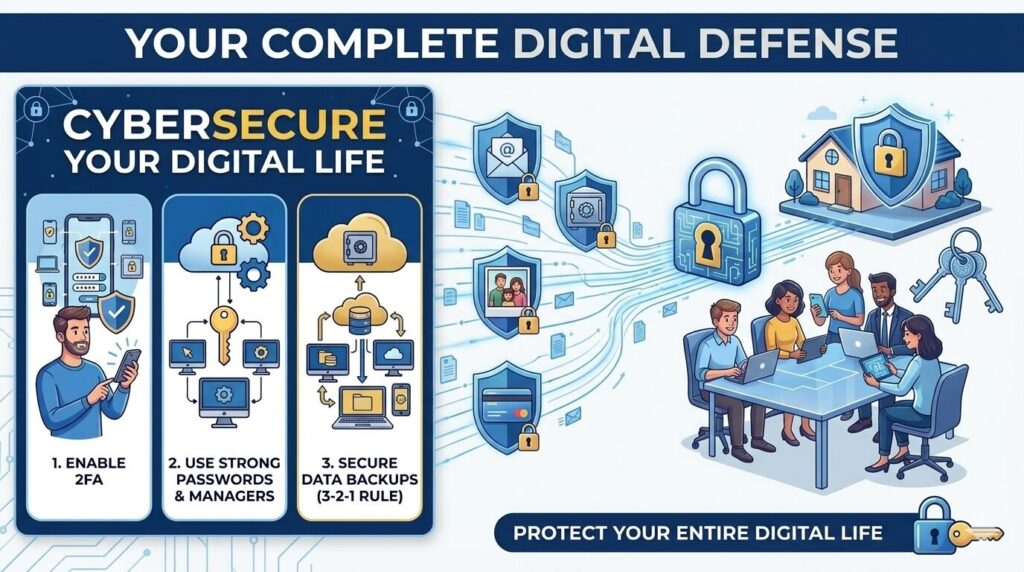
That sleek “CYBERSECURE YOUR DATA” image you may have seen on Instagram (shown below) boils it down perfectly. The message is simple but urgent: A small mistake—like clicking one wrong link—or one weak password can expose your entire digital life to attackers.
[Insert Infographic image here]
Cyberattacks are no longer abstract threats that only affect large corporations or government agencies. They happen to everyday individuals every single day. The consequences are often severe, ranging from devastating financial loss and identity theft to years of credit-shredding repair and profound privacy violation.
The good news is that you aren’t helpless. Cybersecurity doesn’t require you to be a tech genius. It’s mostly about building simple, consistent habits that create a powerful layered defense.
Your Digital Fort Knox: A Three-Panel Defense Strategy
Let’s break down the core pillars of a secure digital life, as highlighted in the infographic’s three vertical panels:
Panel 1: The Essential Double Lock — Enable 2FA
Passwords are your front door. If a hacker has your password, they are inside your house. That’s why you need to Enable Two-Factor Authentication (2FA) on all of your important accounts.
What is it? Think of 2FA as needing both a key and a unique fingerprint to open a vault. After entering your password (something you know), you are asked to provide a second piece of information (something you have)—like a unique code sent to your phone or generated by an app, or even a biometric scan like your face or fingerprint.
Why it’s a non-negotiable: Even if a hacker successfully steals your password in a major data breach, they still cannot access your account without that second factor. You should prioritize enabling 2FA for:
- Online banking and financial accounts
- Primary email accounts (gmail, outlook)
- Social media (Instagram, Facebook, Twitter)
- Cloud storage (Dropbox, iCloud, OneDrive)
Panel 2: Forging Stronger Keys — Use Strong Passwords
The middle panel is perhaps the most classic piece of advice for a good reason: it’s where most security fails begin. Use Strong Passwords. Using your dog’s name followed by “123” is like leaving a spare key under the welcome mat. Hackers have powerful automated tools that can crack weak passwords in milliseconds.
Your Strong Password Blueprint:
- Length is critical: Aim for at least 12-16 characters. Longer is always better.
- Embrace a mix: Use uppercase letters, lowercase letters, numbers, and symbols (e.g., $, %, *, !).
- The Golden Rule: Never Reuse Passwords. Every account needs its own unique key. If one account is breached (like a random forum you used once), and you reuse that password everywhere, hackers now have the key to your banking and email too.
The Solution: If this sounds impossible to remember, it is. The answer is to Use a Password Manager. These secure tools generate incredibly complex, unique passwords for every site you visit and store them encrypted. You only have to remember one very strong master passphrase to unlock the manager itself. Protect your password manager with a strong master password and, you guessed it, 2FA!
Panel 3: The Ultimate Safety Net — Back Up Data
The final panel focuses on resilience. Preventative measures sometimes fail, or you might suffer an unavoidable data loss event. Your last line of defense is this: Regularly Back Up Data. This means consistently saving copies of your important files to a secure location that is separate from your main device.
Why backups are a superhero: A solid backup can save you from:
- Ransomware: If an attacker encrypts your data and demands money, a recent backup allows you to wipe the device and restore your files, rendering their threat useless.
- Hardware Failure: When your hard drive crashes unexpectedly, your data is not lost forever.
- Loss or Theft: If your laptop is stolen, you haven’t lost your irreplaceable family photos.
The Strategy: Aim for redundancy. The best practice is often the 3-2-1 rule: Keep at least 3 copies of your data, on 2 different media types, with at least 1 copy stored off-site (e.g., in the cloud). Using automated cloud backup services makes this incredibly easy and reliable.
Leave a Reply